
Password Generation
Overview
Passwords are not a very good form of authentication. They are easy to use but
they are trivial to steal, either through phishing, malware, or a
malicious/
Chrome's long term solution to this problem is browser sign in plus OpenID. While implementing browser sign in is something that we can control, getting most sites on the internet to use OpenID will take a while. In the meantime it would be nice to have a way to achieve the same affect of having the browser control authentication. Currently you can mostly achieve this goal through Password Manager and Browser Sync, but users still know their passwords so they are still susceptible to phishing. By having Chrome generate passwords for users, we can remove this problem. In addition to removing the threat of phishing, automatically generating password is a good way to promote password manager use, which should be more secure and seamless than manual password management.
Design
Generating and Updating Passwords
Detecting when we are on a page that is meant for account sign up will be most of the technical challenge. This will be accomplished by a combination of local heuristics and integration with Autofill. In particular, the password manager will upload information to Autofill servers when a user signs in using a saved password on a form different from the one it was saved on. This gives a strong signal that the original form was used for account creation. This data is then aggregated to determine if the form is or isn't used for account creation. Those that are will be labeled as such by Autofill. If a signal is received from Autofill when the form is rendered, we mark the password field. When the users focuses this field, we show an Autofill like dropdown with a password suggestion.
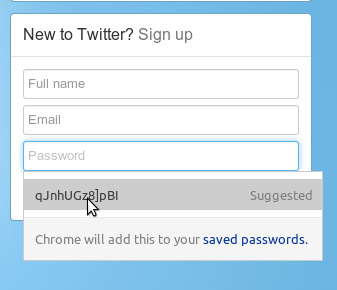
The generated password is generic enough that it works on most sites as is, but not all sites have the same requirements. Eventually we will use additional signals to craft the generated password we use, but for now we ease editing by showing the password if the user focuses the field and also sync any changes made to the confirm password field (if one exists).
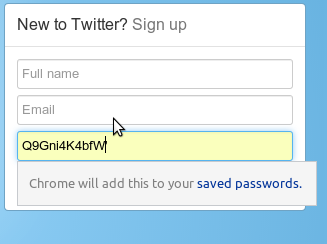
The user doesn't need to explicitly save a password that is generated as it happens automatically, and they should go through the normal password management experience from that point on.
Retrieving Passwords
While generally it's good that users don't know their passwords, there are times when they will need them such as when they aren't able to use Chrome. For these cases, we will have a secure password storage web site where users can sign in and view (and possibly export?) their passwords. Since it should be relatively rare that users need this, and since this information is valuable, we are debating adding additional safety checks here, such as a prompt to enable StrongAuth. TODO(gcasto): Add link once this site is live.
Implementation
Renderer
PasswordGenerationAgent is responsible for both detecting account creation password fields and properly filling and updating the passwords depending on the users interaction with the UI.
Browser
PasswordGenerationManager takes messages from the renderer and makes an OS specific dropdown. This UI use a PasswordGenerator to create a reasonable password for this site (tries to take in account maxlength attribute, pattern attribute, etc.). If the password is accepted, it is sent back to the renderer.
Caveats
Users must have password sync enabled
Since users are not going to know their passwords, we need to be able to retrieve it for them no matter which computer they are using.
Not all websites can be protected
This feature only works for sites that work with both the password manager and Autofill. Currently this means sites that do signup with only two input fields (e.g. Netflix) aren't covered since Autofill doesn't upload in this case. It also means that sites that don't work with the password manager (e.g. sites that login without navigation) aren't covered.
Users are only protected for new passwords
We will not force users to use this feature, we simply suggest it when they sign up. Eventually we will want to prompt on change password forms as well, though the password manager currently doesn't have this capability.
Feature makes Google a higher value hijacking target
Google is already a high value target so this shouldn't changes much. Moreover it's easier for us to make logging into Google more secure via StrongAUTH than have every site on the internet secure itself. At some point in the future it might also be possible for us to automatically change all of a users passwords when we realize that their account is hijacked.